

To ERP or not ERP? That is the question.
How to tell whether a Shopify store needs an ERP or simply cleaner operations and better-connected tools.

Executive Summary
How to tell whether a Shopify store needs an ERP or simply cleaner operations and better-connected tools.
Or does the answer lie somewhere else?
ERP, like AI, has become such a fun term to throw around these days. Need something? AI. Your storefront doesn’t work? ERP. Orders getting delayed? ERP? Something goes wrong in the slightest, probably ERP.
But honestly does your Shopify store need an ERP right off the bat or has it become some sort of magic escape goat for all your problems?
Truth is that most Shopify stores do not need an ERP when they launch. I mean if you have the money burning a hole in your pocket then go for it, but realistically why would you? Being a business owner means you invest your money, time and effort into things that will compound and actually reap rewards for you
Most Shopify stores are usually a single storefront and one warehouse. A single storefront and one single warehouse will always lead to predictable and manageable order volumes.You don’t need a large complex solution that drives you insane and honestly, it can usually operate effectively with Shopify and a handful of specialized applications. At this stage, adding an enterprise resource planning system will introduce more cost and complexity than value. ERPs are bulky and complex to manage, and at the nascent stages of your business, your primary focus should be on growing your business and keeping costs down to a minimum.
Unless of course you have a lot of investor money to burn, queue every AI company.
The question does become more difficult to answer as your business grows, because there isn’t a set stage or a chart that you can refer to that says, “Hey, get that ERP system now. Go on, you’ve earned it.”
Does opening a second warehouse justify getting an erp? Not necessarily.
If your wholesale and marketplace orders are being drawn from the same inventory, or your finances, fulfillment and customer service departments maintaining different records; employees export CSV files, copy information between systems and reconcile discrepancies at the end of each day, can paint a very pretty but misleading picture of possibly needing an ERP.
These symptoms may indicate that the company has outgrown its operating model. But they do not automatically mean it needs an ERP.
The main underlying question that businesses fail to answer is -
“Has your business developed genuine cross-functional complexity, or is it compensating for unclear processes and poorly connected tools?”
The right choice builds a durable operating foundation, but a poor one merely swaps manual headaches for costly technical debt.
The actual purpose of ERP integration
An ERP solution is like a bridge or connective tissue for the business. It links all your important day to day businesses under one manageable roof. All of your operational day-to-day ranging from finance, procurement, inventory, and supply chain operations. Integration is the mechanism that links this core system to Shopify and your wider application stack, ensuring that business data flows across the organization with precision.
In many ways, the quality of the integration is more critical than the ERP itself, which honestly is super overlooked from time to time.
Just like any chain, if there is a broken or loose link, sooner or later everything will fall apart.
If your ERP was never set up properly and is consistently fed fragmented orders, lagging inventory counts, or clashing product identifiers, it won’t provide a single source of truth. This will do more harm than good and you will burn through your money faster than what you could possibly recover, all while getting a bunch of inaccurate information.
A functional integration requires clear definitions for:
Explicit ownership of every business record
The specific data points shared between systems
The intended direction of each sync
Required latency and sync frequency
Policies for handling missing or conflicting records
Designated owners for troubleshooting failures
Shopify defines ERP integration as
“the process of connecting an enterprise resource planning system with other software applications, databases, or external systems. It powers reliable data flow, synchronization, and automation across different business functions. This in turn enhances efficiency, visibility, and decision-making capabilities within an organization.”
At a high level, an ERP integration connects three things:
Business functions (like HR, finance, supply chain, ecommerce)
The tools that move data (such as APIs or middleware)
The integration method you choose (custom, native, iPaaS, and more).
Where To Start? To The Decision Ladder
Before evaluating ERP platforms, work through the available options in order.
1. Fix your Shopify-native operations
Don’t fall for the marketing hype. Cut out all the unnecessary noise and bring your focus back to your business. Shopify might still be the right choice for your business if the business has straightforward products, fulfilment rules and inventory locations.
Look first for configuration problems, undocumented procedures and unnecessary manual approvals. Cleaner naming conventions, staff permissions, fulfilment rules or inventory procedures may remove the apparent need for another system.
2. Add a specialist application
Identify the main bottleneck and invest in a specialist solution rather than investing in new architecture. 9/10 times, Shopify has already installed the integration that you need to fix the specific solution or there is already a pre-built app in Shopify marketplace that solves this.
Worst case scenario, if none of these options exist, you can have a custom app built and it will still turn out to be a cheaper solution rather than having an ERP integrated.
An inventory, shipping, returns, reporting or purchasing application may provide the missing capability without requiring a company-wide transformation.
3. Consider an OMS or WMS
The two steps before really investing into an ERP essentially just boil down to your management systems. An OMS or order management system can help when order routing and cross-channel orchestration are the main challenges. A warehouse management system is more appropriate when receiving, picking, packing, replenishment and warehouse accuracy are the primary concerns.
These systems may be enough when operational complexity is concentrated in fulfilment rather than spread across finance, purchasing and commerce.
4. Introduce an ERP and integration layer
An ERP becomes relevant when multiple functions must work from coordinated records and rules for example, when inventory decisions depend on purchasing, warehouse availability, open orders, financial controls and several sales channels.
Company size alone is a poor trigger. The better test is whether the existing systems can still make cross-functional decisions reliably.
Sooooooo, when is the right time to introduce an ERP
This is a question that has really bothered business owners for years. It’s important to logically look at your whole business and understand its different failures and gaps. Typically though the right moment sits between two failures.
Too early, and the company automates processes it has not yet understood. Too late, and manual work has already caused customer, inventory or financial damage.
If you’re going to use an ERP to solve for issues such as
resolving unclear product data
inconsistent warehouse procedures
disputes over ownership.
Then you aren’t really going to solve any of these inherent problems. A new ERP system will inherit those problems and make them more expensive to change.
Think of it like this - as long as you are able to identify the root cause of your problems, chances are you don’t really need an ERP. ERP systems bring a lot of value when done right, and usually large businesses, with multiple chains of operations are the most ideal candidates for an ERP.
If you are selling cakes out of your garage, you definitely don’t need an ERP, but if you are selling cakes, cupcakes, deserts, chocolates out of multiple garages with multiple delivery partners and multiple dependencies to fall back on, ERP might be the right solution.
An ERP may also be excessive when:
The problem belongs to one department. For example you know your orders are not going out on time, do you really need to invest around $500,000(average price to integrate an ERP system btw) to fix it?
One specialist application can remove the bottleneck
The required process has not yet been defined
The business cannot assign internal ownership
Data quality is too poor to support automation
The projected benefit does not justify implementation and maintenance costs
The responsible decision may be a better process, a smaller tool or a focused OMS or WMS implementation.
An ERP should coordinate genuine cross-functional complexity. It should not serve as a symbol that the company has “graduated” into enterprise status.
A Shopify business is ready when it can describe:
The operating problem it needs to solve
The processes the system should enforce
The owner of every important record
The required speed of each data flow
The exceptions the integration must handle
The people responsible for monitoring it
The measurable result that will justify the investment
When those answers are clear, an ERP integration can become a durable operating foundation. Until then, cleaner operations may deliver more value than another major system.
If disconnected systems are becoming the constraint, KLOC can map the Shopify, ERP, WMS, CRM and fulfilment flows before recommending an architecture.
Seven red flags that your operational model is broken
1. Data entry has become a full-time repetitive chore
If your team is constantly shuffling orders, invoices, or customer details between different windows, you're asking for trouble. This manual copy-pasting is a massive bottleneck that leaves your accuracy at the mercy of whoever hasn't had their coffee yet.
2. Inventory is a "choose your own adventure" story
When Shopify, your warehouse, and your finance books all show different numbers, you don't have a single source of truth—you have a mess. Usually, this leads to staff padding stock levels or frantically double-checking shelves before they dare to hit "ship."
3. New channels bring more headaches than profit
Expanding into B2B or marketplaces should be exciting, not exhausting. If every new sales channel just multiplies your reconciliation work because nothing stays in sync, your administrative engine is effectively redlining.
4. Exceptions have become your standard operating procedure
Things like split shipments, complex bundles, and multi-location returns shouldn't require a manual rescue mission every time they happen. If "normal" orders are the exception and manual fixes are the rule, your foundation is cracked.
5. Procurement is flying blind
You can't buy stock effectively if you can't see real-time demand and incoming shipments in one place. When reordering depends on a "gut feeling" or a dusty spreadsheet, you're either going to run out or end up with a warehouse full of dead stock.
6. Finance is always looking in the rearview mirror
If your finance team is stuck stitching together CSV exports just to get a basic operational snapshot, you're making decisions based on old news. By the time the report is ready, the opportunity (or the crisis) has already passed.
7. The "Bus Factor" is dangerously low
When your entire reconciliation process lives inside one person's head, that person isn't just an employee—they're a single point of failure. If your business grinds to a halt because one expert took a vacation, your infrastructure isn't a system; it's a liability.
While no single symptom is a "get an ERP now" button, seeing these signs across multiple departments is a loud wake-up call. It means your business has outgrown its patchwork of tools and needs a genuine, coordinated operating system to survive the next stage of growth.
Define ownership before discussing architecture
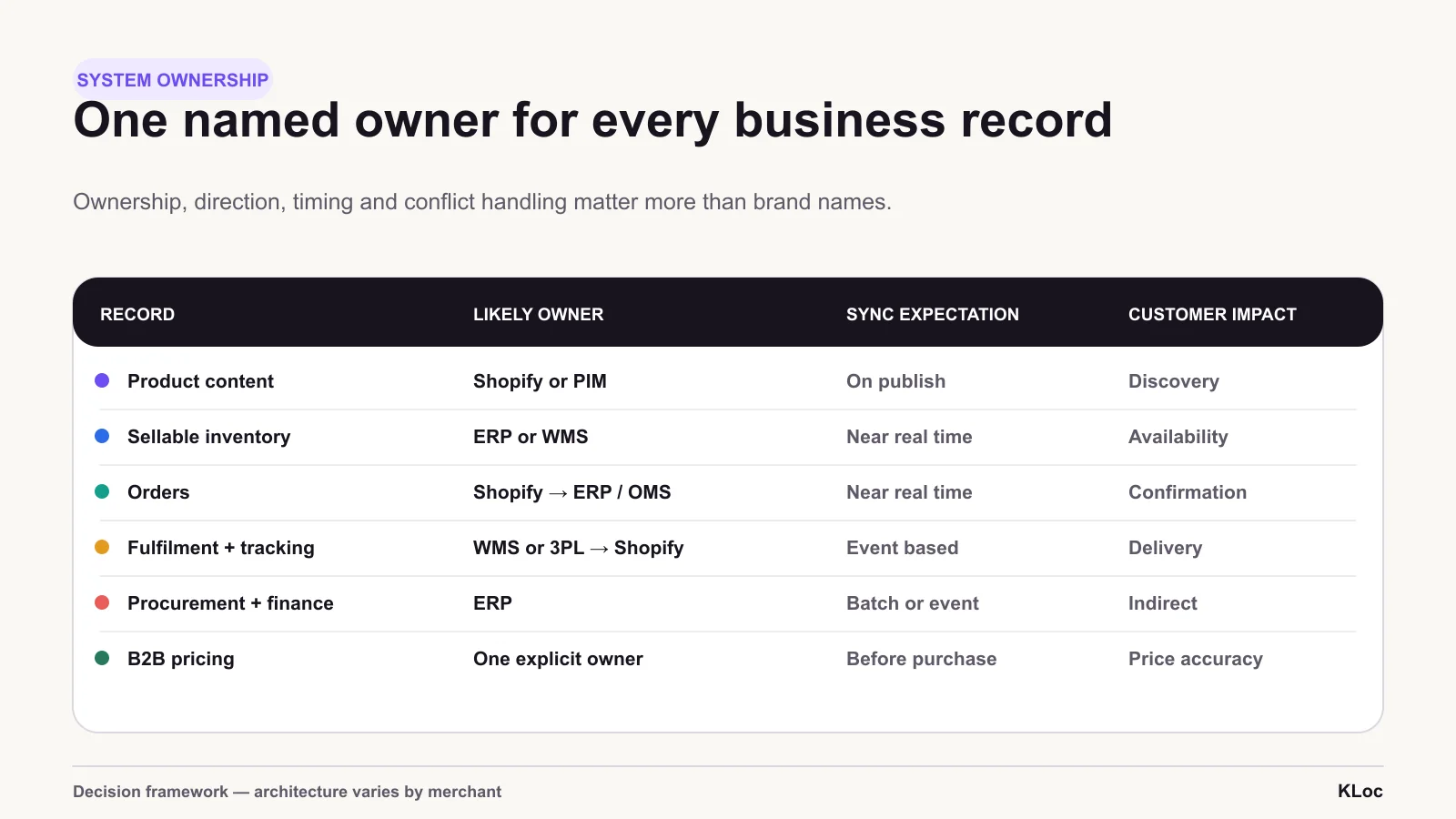
“Single source of truth” is useful only when it is specific. Not every record needs to originate in the ERP, and allowing multiple systems to overwrite the same value creates conflict.
A practical ownership model might look like this:
| Data domain | Likely owner | Direction | Typical timing |
|---|---|---|---|
| Web descriptions and media | Shopify or PIM | To storefronts | On approval or publication |
| Sellable inventory | ERP or WMS | To Shopify and other channels | Real time or near real time |
| Ecommerce orders | Shopify | To ERP, OMS or WMS | Near real time |
| Fulfilment and tracking | WMS, ERP or 3PL | To Shopify | Near real time |
| Procurement and financial records | ERP | Internal or to reporting systems | Scheduled or event-based |
| Customer-service context | Shopify or CRM | Based on the service workflow | Near real time |
| B2B pricing | ERP or Shopify catalogue | To agreed channels | Before purchase |
This is not a universal architecture. The important rule is that every business record has one named owner, an agreed direction and a defined conflict policy.
Match the integration method to the operation
The most sophisticated technology is not always the most appropriate.
Vendor-built or certified connector
A prebuilt connector is often the quickest route when Shopify and the chosen ERP are already supported and the business follows relatively standard processes.
However, “prebuilt” does not mean “complete.” Validate how the connector handles bundles, returns, edited orders, customer-specific pricing, multiple locations and local tax or finance requirements.
Middleware or iPaaS
Middleware or an integration platform as a service provides a translation and orchestration layer between Shopify, the ERP, CRM, WMS, 3PL and other systems.
This can be valuable when several applications need shared mappings, monitoring and reusable workflows. It adds another platform and cost centre, but can prevent a web of fragile point-to-point connections.
Custom API integration
Custom development may be justified when the company has genuinely distinctive processes or uses an unsupported ERP.
It also creates long-term responsibility. The business must own data contracts, API changes, testing, security, monitoring, retries and technical documentation. Custom code should solve a meaningful competitive or operational requirement, not reproduce a connector that already exists.
Batch files or ETL
Scheduled files and ETL pipelines remain useful for finance, reconciliation, historical reporting and analytics.
They are usually unsuitable for information that affects a live customer promise. Inventory availability, order status and fulfilment events often need real-time or near-real-time updates, while an end-of-day financial summary may not.
Account for the full cost
The business case should extend beyond the ERP licence.
Include:
Implementation and integration work
Data cleansing and migration
Middleware or connector subscriptions
Testing and parallel operation
Staff training and process documentation
Internal project ownership
Monitoring and support
Future customisation
Maintenance when APIs or business rules change
Compare that total with the present cost of manual work, stock discrepancies, delayed fulfilment, oversells, cancellations, late reporting and constrained growth.
An ERP is justified when it reduces meaningful operating cost or risk—not simply because the company has reached a particular revenue milestone.
Clean the operation before automating it
An integration will enforce whatever rules it is given, including poor ones.
Before implementation:
Remove duplicate product, customer and supplier records.
Standardise SKUs, location codes, currencies, units and identifiers.
Document the desired order, return, purchasing and fulfilment processes.
Decide who owns each data domain.
Separate normal processing from exceptions.
Define what the integration should block, retry, quarantine or escalate.
Shopify’s guidance similarly emphasises planning, data validation, access reviews, duplicate removal and communication with affected teams. These are operational requirements, not optional implementation polish.
Test the awkward orders
A successful standard order proves very little. Integration quality becomes visible at the edges.
Test scenarios such as:
Partial fulfilment
Cancellation after warehouse allocation
Return to a different location
Component-based bundle
Product without an ERP identifier
Duplicate webhook or event delivery
Temporary ERP or warehouse downtime
Price change during checkout
Edited order
Multi-currency refund
Inventory adjustment occurring simultaneously in two systems
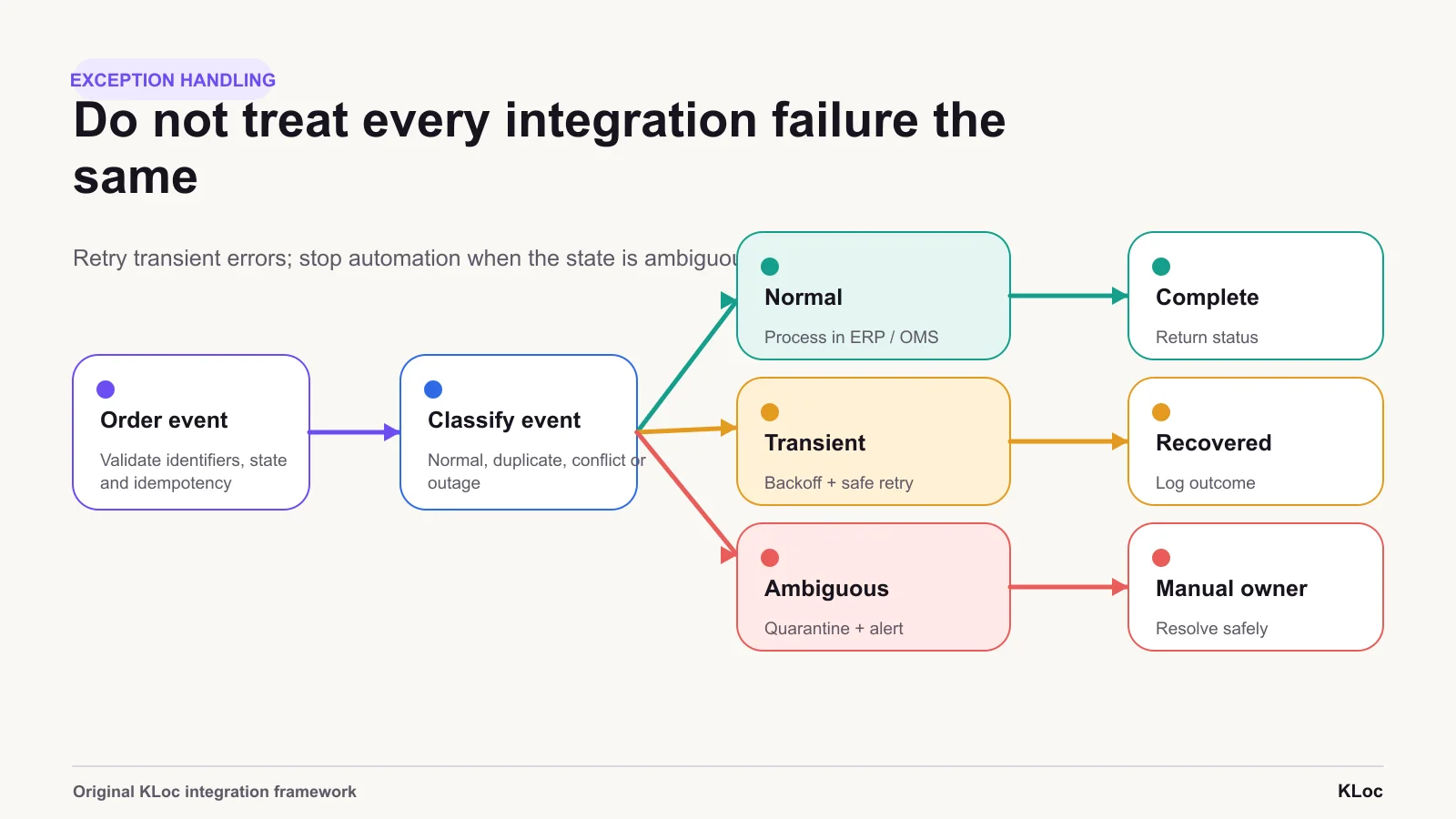
For each scenario, decide whether the integration should retry, alert someone, stop the next action or quarantine the record for investigation.
Silent failure is the most dangerous outcome. A visible error can be resolved. A sync that appears successful while transferring incomplete information can damage hundreds of orders before anyone notices.
Treat security and adoption as design requirements
ERP integrations handle commercially and personally sensitive information. Each connection expands the area that must be secured.
Use encrypted connections, modern authentication, role-based access and the minimum permissions required by each integration. An inventory connector, for example, should not have access to unrelated payroll data. Shopify’s current guidance also recommends regular auditing and stronger authentication standards such as OAuth 2.0 or OpenID Connect.
Technical controls alone are insufficient. Warehouse, finance, customer-service and ecommerce teams must understand how their responsibilities will change. A technically correct integration can still fail if employees create unofficial workarounds because the new process was poorly communicated.
Measure the operation after launch
An integration is not finished when data moves successfully during a demonstration.
Monitor:
Percentage of orders reaching downstream systems without manual work
Inventory-update latency
Sync failures and successful retries
Oversells and stock-related cancellations
Manual inventory adjustments
Order-to-fulfilment time
Reconciliation exceptions
Quarantined records and their resolution time
Repeated failures by workflow or data type
Assign a named owner to review these measures. A dashboard that nobody checks is not monitoring.
Exception handling
A reliable integration defines the owner, direction and timing of every record, then gives failed or ambiguous events a controlled route.
Operating measures
Measure the integration with your own event logs and customer-impact data. These are operating measures, not an external benchmark.
The right team for
the work ahead.
Share the brief, the context, or the challenge. We respond within one business day.
Division 01 · KLOCOM
Commerce Engineering
Shopify Plus builds, migrations, integrations, managed services, and agentic commerce architectures.
Explore KLOCOMDivision 02 · KLOCAPPS
Custom Software
Web and mobile applications, platforms, enterprise integrations, and applied AI products built to last.
Explore KLOCAPPSDivision 03 · KLOCERS
Technology Talent
Senior individual engineers, delivery pods, and embedded engineering teams shaped around your systems and delivery brief.
Explore KLOCERS