

WooCommerce to Shopify Migration: A No-Drama Checklist for Growing Stores
What moves, what needs to be rebuilt and what a growing ecommerce brand should check before changing platforms.

Executive Summary
What moves, what needs to be rebuilt and what a growing ecommerce brand should check before changing platforms.
Begin with the problem, not the platform
Before comparing feature lists, write down what is going wrong.
Migration is worth examining when:
Hosting and traffic spikes require repeated intervention.
Plugin updates create conflicts or regressions.
Routine merchandising changes depend on a developer.
The checkout or theme has accumulated difficult custom code.
International, B2B or omnichannel plans do not fit the current architecture.
Maintenance consumes engineering time that could support growth work.
The combined cost of hosting, plugins, support and development is difficult to justify.
Some of these problems can be fixed without migrating. Replatforming is justified only when the expected improvement outweighs the cost and disruption of rebuilding.
What transfers easily and what needs rebuilding
Shopify's official guide covers products, customers, historical orders and reviews, but transfer methods and limitations vary.
| Data or feature | Can it move? | What needs attention |
|---|---|---|
| Products | Usually | Options, variants, images, SKUs and custom fields must map to Shopify's model. |
| Customers | Usually | Customer passwords cannot be imported through CSV. |
| Historical orders | Possible | They require a suitable migration method and careful verification. |
| Reviews | Usually possible | The review platform and data format must be compatible. |
| Content | Possible | Formatting, media and URLs may need rebuilding. |
| Subscriptions | Complex | Contracts, renewals and payment tokens need specialist handling. |
| Plugins and custom code | No direct transfer | Each function must be replaced, redesigned or removed. |
| SEO authority | Protectable, not importable | URLs, content, metadata, canonicals and redirects must be planned. |
One detail deserves special attention: customer passwords cannot be imported through Shopify's customer CSV. Returning customers must be invited to create new credentials. Plan that communication before launch.
Seven phases for a controlled migration
1. Discovery and audit
Crawl the site, inventory its data and integrations, identify revenue-critical journeys and record baseline performance. Include organic clicks, conversion, checkout completion, Core Web Vitals and revenue by device. Without a baseline, "the migration went well" is only an opinion.
2. Shopify data architecture
Map WooCommerce products, attributes, categories and custom fields to Shopify products, variants, collections, metafields and metaobjects. Do not recreate every historical workaround.
3. Experience and feature rebuild
Rebuild the theme, then classify each old function as Shopify-native, app-based, custom or no longer needed.
4. Integration rebuild
Reconnect payments, tax, shipping, operational systems, marketing tools, feeds and analytics. Test the full business workflow. A "Connected" badge proves very little.
5. Rehearsal migration
Run at least one representative migration. Compare counts and inspect difficult products, customers and orders; totals can match while individual records remain wrong.
6. SEO and redirect plan
Map every valuable WooCommerce URL to the most relevant Shopify destination; do not send every retired page to the homepage. Google recommends permanent server-side redirects and keeping them for at least one year. Shopify can import redirect mappings by CSV.
7. Cutover and monitoring
Control changes on the old store, run the final delta migration, test checkout and connect the domain. Then watch old and new URLs, Search Console, analytics, payments, feeds and integrations. Google says a medium-sized site may take a few weeks for most URLs to move in its index; temporary fluctuation is normal, sustained errors are not.
Launch-day checklist
Before opening the new store, confirm:
Payments, tax and shipping in priority markets
Discount codes and gift cards
Customer-account activation
Transactional email, consent and privacy tools
Analytics and advertising attribution
Product feeds
Mobile checkout
Redirect imports and spot checks
ERP/WMS and fulfilment updates
Rollback responsibilities and escalation contacts
Run low-value production orders using real payment and fulfilment routes. A development test order is not a complete customer journey.
What to watch during the first 30 days
Track:
404s and redirect chains
Indexed pages, organic clicks and 404s
Conversion and checkout errors by device
Order and inventory sync failures
Feed disapprovals and customer-login questions
Search failures and real-user page performance
Compare everything with the baseline and annotate campaign changes that could distort the comparison.
The safest migration gives every risk an owner. The data has been rehearsed, and the team knows which signals will reveal a problem early.
Before a WooCommerce move, KLOC can audit the store, integrations and SEO exposure and then recommend whether migration is the right approach.
Sources: Shopify's WooCommerce migration guide, customer password limitations, Shopify redirect documentation, and Google's site-migration guidance.
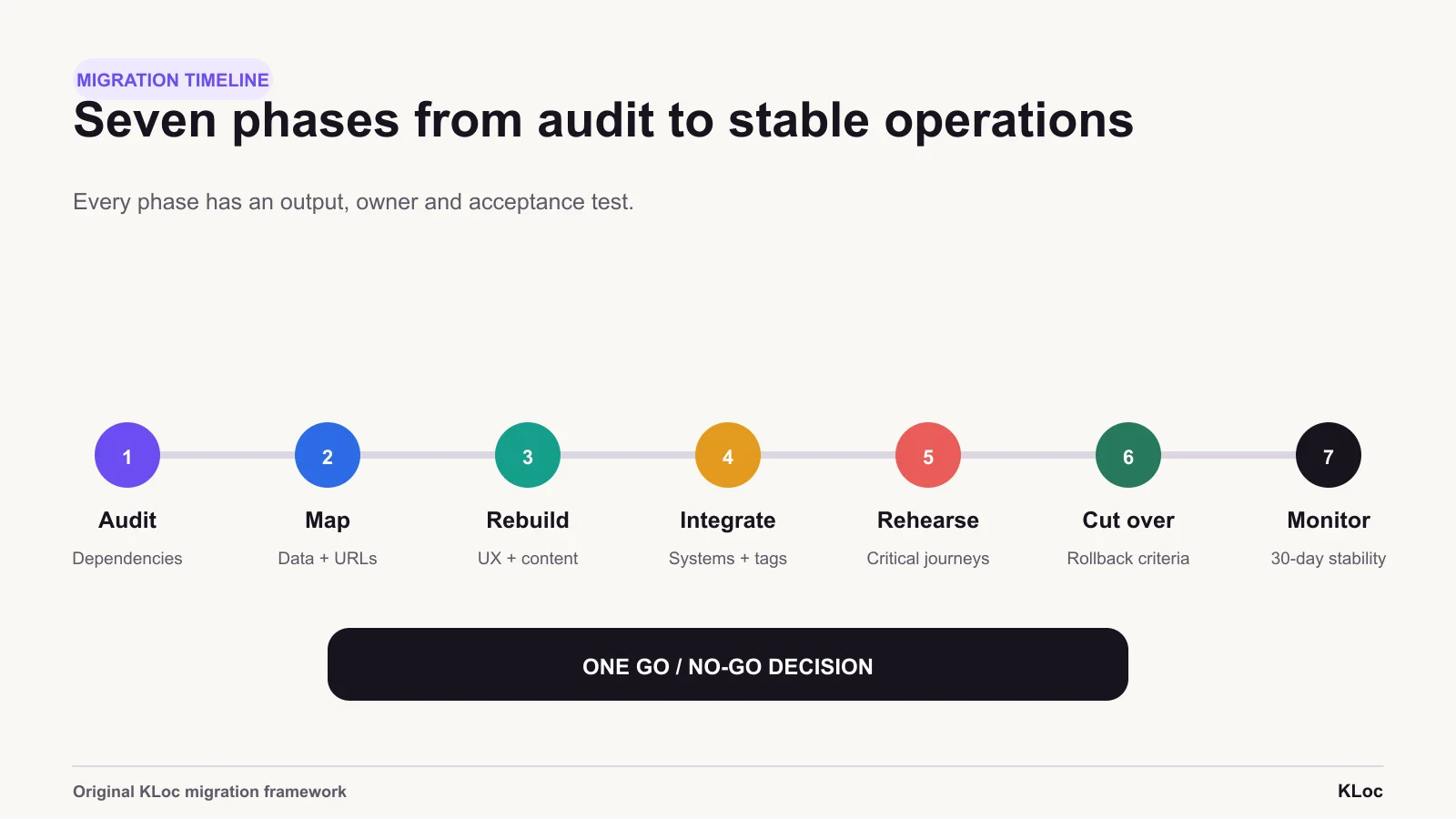
Migration phases
Seven phases turn a platform switch into a controlled programme: audit, architecture, rebuild, integrations, rehearsal, cutover and monitored stabilisation.
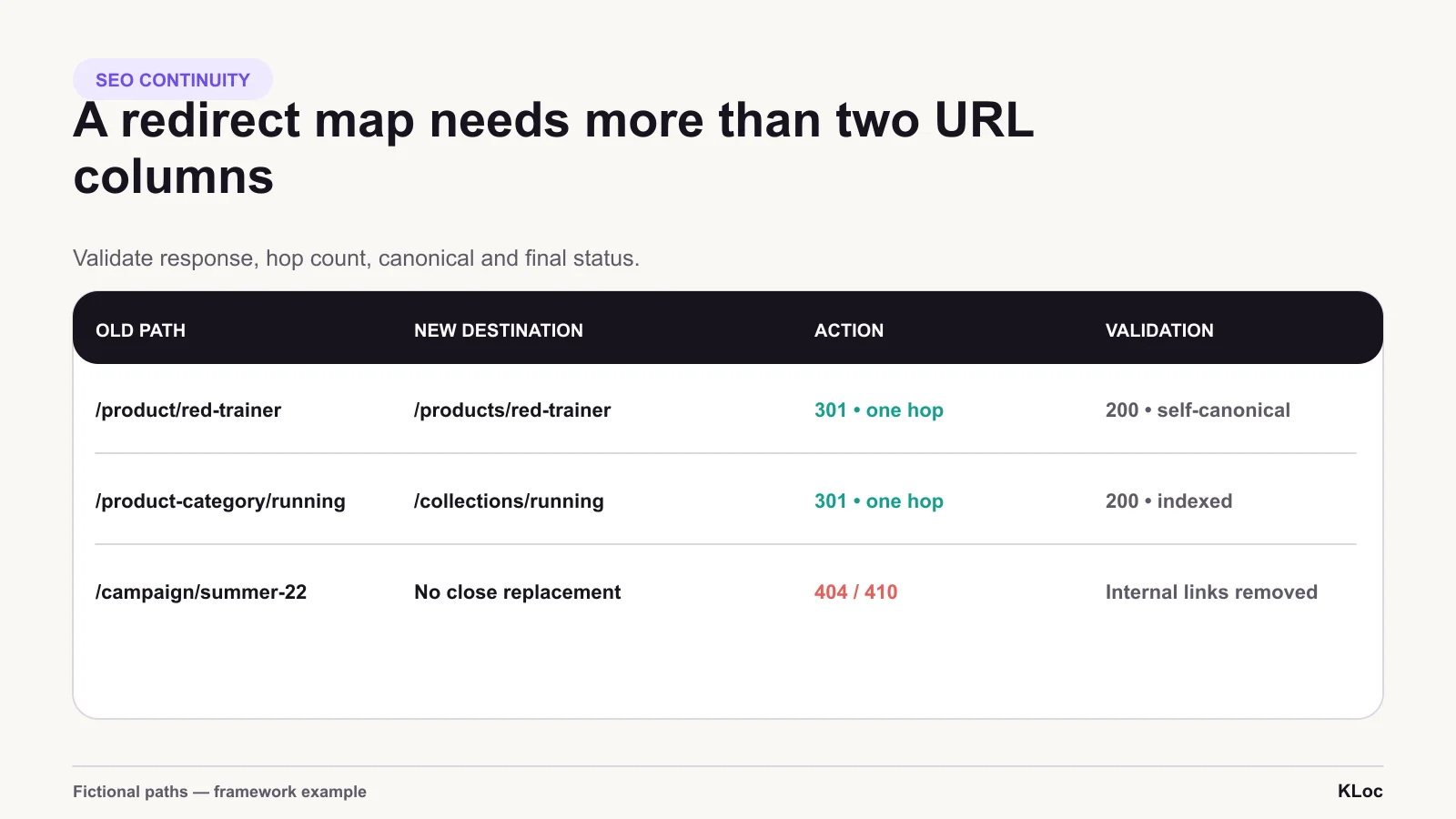
Redirect validation
A redirect map needs more than two URL columns. Record status, hop count, destination response, canonical and validation result.
The right team for
the work ahead.
Share the brief, the context, or the challenge. We respond within one business day.
Division 01 · KLOCOM
Commerce Engineering
Shopify Plus builds, migrations, integrations, managed services, and agentic commerce architectures.
Explore KLOCOMDivision 02 · KLOCAPPS
Custom Software
Web and mobile applications, platforms, enterprise integrations, and applied AI products built to last.
Explore KLOCAPPSDivision 03 · KLOCERS
Technology Talent
Senior individual engineers, delivery pods, and embedded engineering teams shaped around your systems and delivery brief.
Explore KLOCERS